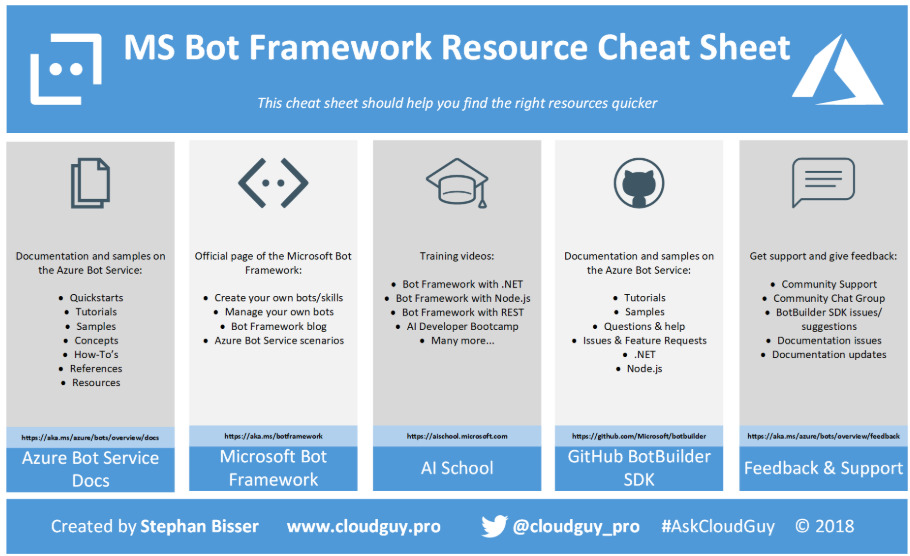
Nowadays, there is a ton of information out there for every service Microsoft has released, which is a good thing. But there are times when you search for something special, but you can’t find it as there are too many sites and resources which you need to crawl to find what you are looking for. The same is true for the Azure Bot Service and the MS Bot Framework, as there is plenty of documentation, but it is spread over a couple of different sites.
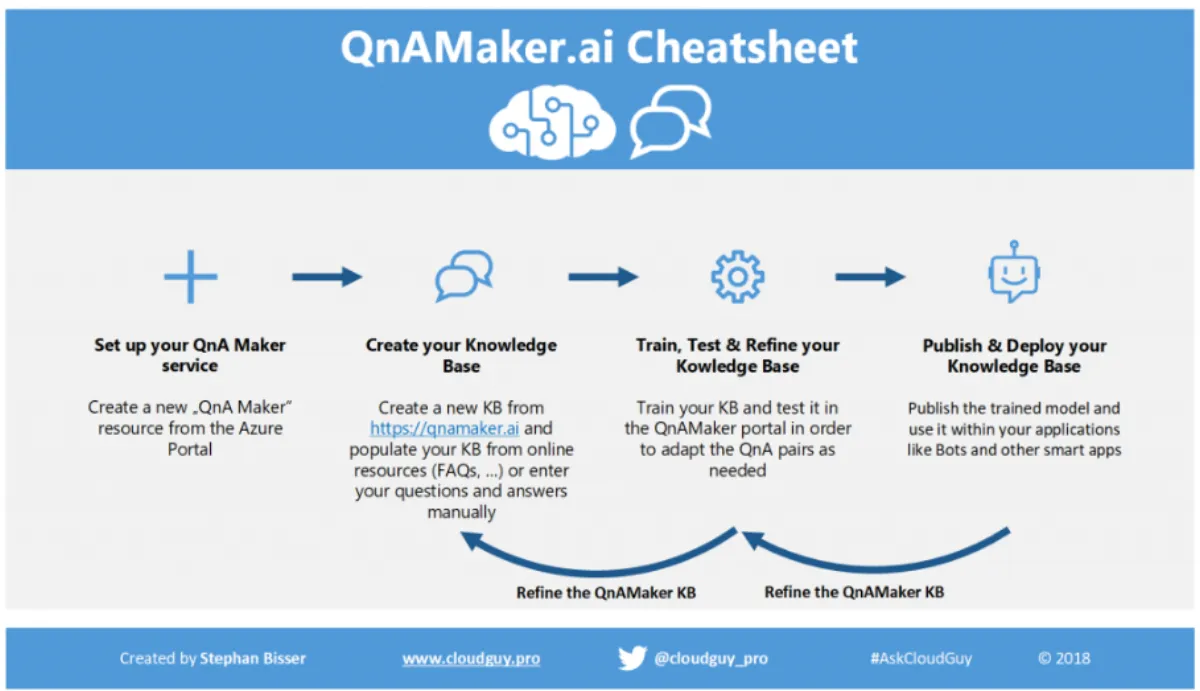
“Copy, paste… Bot!” - This is the slogan of the QnAMaker.ai service, which is one of the Cognitive Services in the knowledge category. This service offers a very easy-to-use toolset for creating, populating and publishing knowledgebases for FAQs which can be consumed by the Azure Bot Service very easy to build smart QnA Bots in a very short period of time.
As the creation of such a QnAMaker knowledgebase is straightforward, the following infographic should help illustrate the process of creating, populating, testing and publishing a KB through the QnAMaker service.
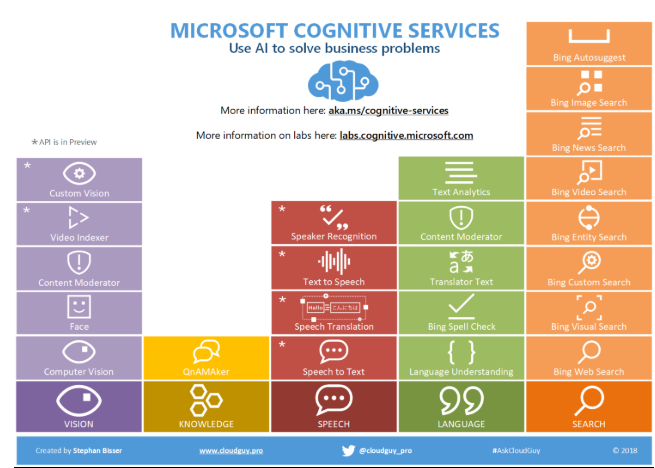
A couple of months ago, I did a post about the Microsoft Cognitive Services with an infographic attached in order to better understand the various services and offerings in that area. Now a couple of months later, some things changed in that field, especially the offerings and the services (some disappeared, some have been merged and some appeared). Therefore, I updated my infographic in order to reflect the current services which are available:
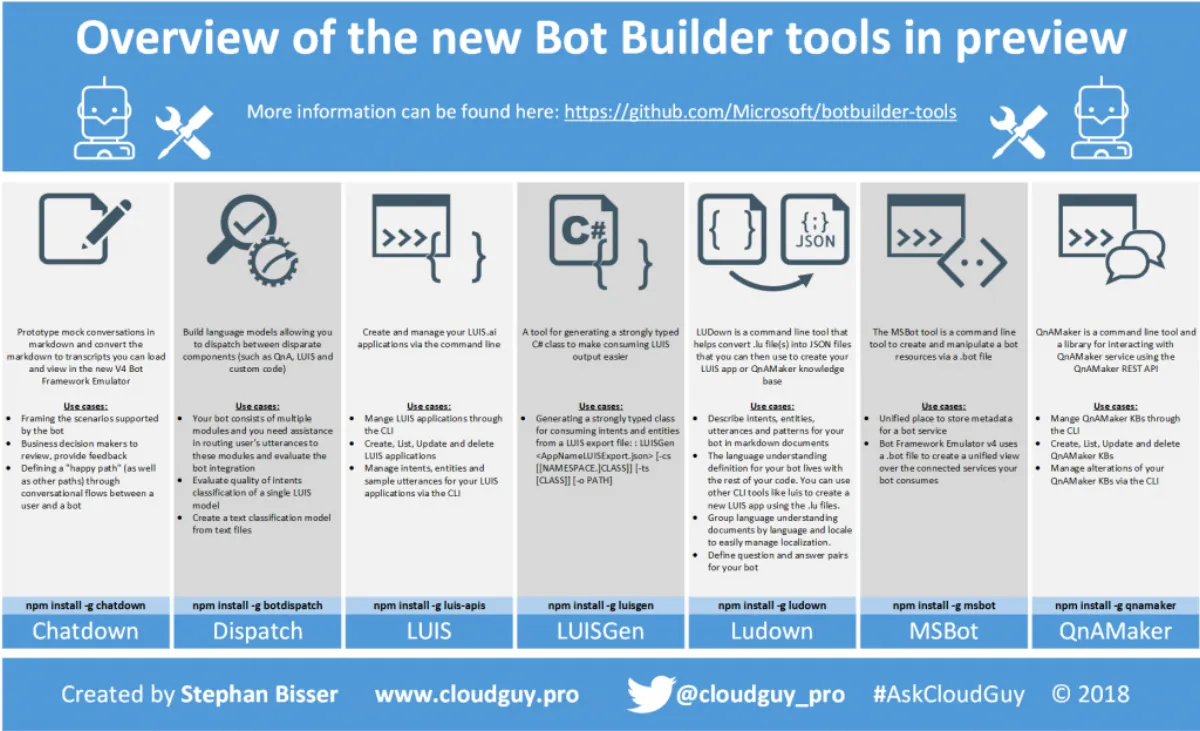
A couple of weeks ago at the Microsoft Build conference (see this post for details on the announcements concerning AI), there were some cool new tools for the Bot Builder announced. These tools are already in preview and can be downloaded here .
The following table should give an overview of the new tools released:
Tool Description Chatdown Prototype mock conversations in markdown and convert the markdown to transcripts you can load and view in the new V4 Bot Framework Emulator MSBot Create and manage connected services in your bot configuration file LUDown Build LUIS language understanding models using markdown filese LUIS Build LUIS language understanding models using markdown files QnAMaker Create and manage QnAMaker.
Microsoft’s annual BUILD conference took again place from 7th - 9th May 2018 with a lot of new and awesome updates for the Azure AI platform. The following list should give you a short overview of all news and announcements:
Bot Builder SDK v4 now in preview: Bot Builder SDK v4 .NET Bot Builder SDK v4 JavaScript Bot Builder SDK v4 Python Bot Builder SDK v4 Java Bot Framework Emulator v4 now in preview: Updates and Improvements “The new emulator includes features like an improved dynamic layout model, support for multiple bot configurations, simplified bot components management, and the ability to inspect responses from and deep link to connected services such as LUIS and QnA.
The idea of this solution has come to my mind a couple of months ago when doing a couple of conference sessions. During the sessions, I had some questions coming from the audience, which is a good thing for me, but somehow I noticed, that those a more or less general questions rather than deep technical ones.
Therefore, I thought it would be helpful for me as well as for the audience to have a much simpler way of asking me questions during speaking engagements, but also whenever someone has a question which might be answered by me.