
Microsoft 365 Copilot Extensibility - Possibilities and Pitfalls

Microsoft 365 Copilot Extensibility: Navigating the Possibilities and Pitfalls#
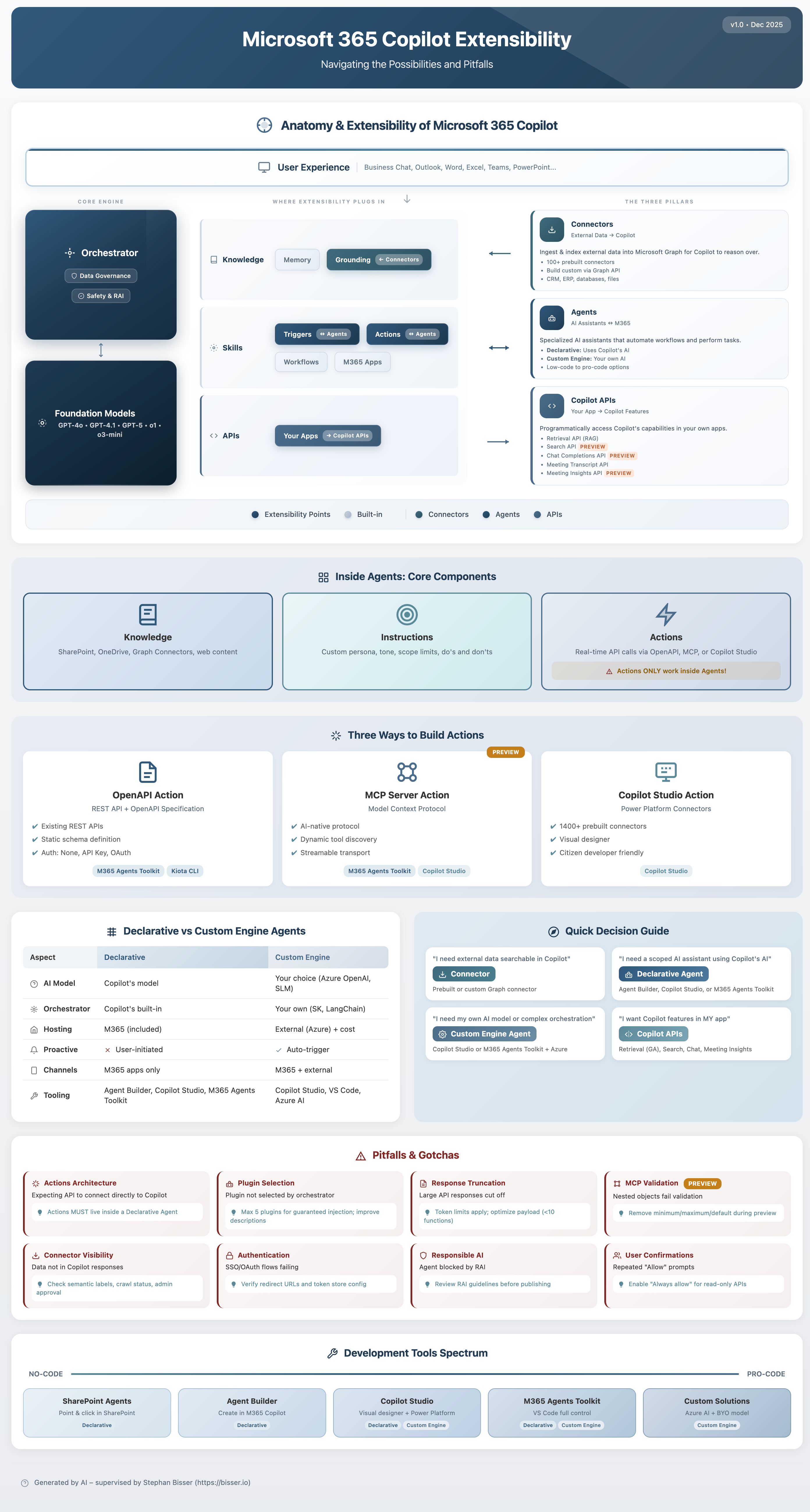
As organizations rush to adopt Microsoft 365 Copilot, a critical question emerges: How do we extend Copilot to work with our unique business data and processes? The answer lies in understanding the three extensibility pillars—Connectors, Agents, and APIs—and knowing when (and when not) to use each. And that’s why I created an infographic for that:
Understanding the Anatomy of Microsoft 365 Copilot#
Before diving into extensibility, let’s understand what we’re extending. At its core, Microsoft 365 Copilot consists of:
The Core Engine#
- Orchestrator: The traffic controller that manages data governance, safety, and responsible AI (RAI) policies
- Foundation Models: The AI backbone powered by GPT-4o, GPT-4.1, and newer models like o1 and o3-mini
Where Extensibility Plugs In#
Copilot’s architecture exposes three key areas for extension:
| Area | Built-in | Extensible Via |
|---|---|---|
| Knowledge | Memory | Grounding ← Connectors |
| Skills | Workflows, M365 Apps | Triggers & Actions ↔ Agents |
| APIs | — | Your Apps → Copilot APIs |
The Three Extensibility Pillars#
1. Connectors: Bringing External Data to Copilot#
Direction: External Data → Copilot
Graph Connectors allow you to ingest and index external data into Microsoft Graph, making it available for Copilot to reason over.
What you get:
- 100+ prebuilt connectors for popular systems
- Custom connector development via Graph API
- Support for CRM, ERP, databases, and file systems
Best for:
- Making enterprise data searchable and available to Copilot
- Connecting line-of-business applications
- Enabling Copilot to answer questions about your proprietary data
⚠️ Pitfall: Connectors only provide read access. If you need Copilot to take actions in external systems, you’ll need Agents.
2. Agents: AI Assistants That Do Work#
Direction: AI Assistants ↔ M365 (Bidirectional)
Agents are specialized AI assistants that can automate workflows and perform tasks. They’re the most powerful—and most complex—extensibility option.
Inside Agents: Core Components#
Every agent consists of three parts:
- Knowledge: Data sources like SharePoint, OneDrive, Graph Connectors, and web content
- Instructions: Custom persona, tone, scope limits, and behavioral guardrails
- Actions: Real-time API calls that let the agent do things
⚠️ Critical Insight: Actions ONLY work inside Agents! You cannot add actions to base Copilot—they must be wrapped in an agent.
Two Types of Agents#
| Type | AI Engine | Best For |
|---|---|---|
| Declarative Agent | Uses Copilot’s AI | Quick deployment, Microsoft-managed AI |
| Custom Engine Agent | Your own AI | Full control, custom models, complex scenarios |
Three Ways to Build Actions#
| Approach | Technology | Characteristics |
|---|---|---|
| OpenAPI Action | REST API + OpenAPI Spec | Existing APIs, static schema, multiple auth options |
| MCP Server Action | Model Context Protocol | AI-native, dynamic tool discovery, streamable (Preview) |
| Copilot Studio Action | Power Platform Connectors | 1400+ prebuilt connectors, visual designer, citizen-developer friendly |
3. Copilot APIs: Embedding Copilot in Your Apps#
Direction: Your Apps → Copilot
Copilot APIs let you programmatically access Copilot’s capabilities from your own applications.
Available APIs:
| API | Status | Purpose |
|---|---|---|
| Retrieval API (RAG) | GA | Query Microsoft Graph with AI-enhanced retrieval |
| Search API | Preview | Semantic search across M365 content |
| Chat Completions API | Preview | Conversational AI with M365 context |
| Meeting Transcript API | GA | Access meeting transcriptions |
| Meeting Insights API | Preview | Extract insights from meetings |
Best for:
- Building custom applications that leverage Copilot
- Integrating AI capabilities into existing line-of-business apps
- Creating specialized user experiences
Common Pitfalls and How to Avoid Them#
Pitfall #1: Using Connectors When You Need Actions#
Symptom: “I connected my CRM data, but Copilot can’t create new records.”
Solution: Connectors are read-only. To write data back, create an Agent with Actions that call your CRM’s API.
Pitfall #2: Building Custom Engines When Declarative Would Suffice#
Symptom: Spending months building a custom AI engine for a simple Q&A bot.
Solution: Start with Declarative Agents. They deploy faster and Microsoft handles the AI infrastructure. Only go custom when you need specific models or complex orchestration.
Pitfall #3: Ignoring Data Governance#
Symptom: Copilot surfaces sensitive data to unauthorized users.
Solution: Connectors and Agents respect Microsoft 365 permissions. Ensure your data sources have proper access controls before connecting them.
Pitfall #4: Overlooking the Actions-in-Agents Requirement#
Symptom: “I built an OpenAPI action but can’t find it in Copilot.”
Solution: Actions must be deployed within an Agent. Create a Declarative Agent, add your action, and deploy the agent to Teams or M365.
Decision Framework: Choosing the Right Approach#
Do you need Copilot to access external data?
├── Yes → Use Graph Connectors
│   └── Do you also need to write back?
│       └── Yes → Add an Agent with Actions
└── No
    ↓
Do you need Copilot to perform tasks?
├── Yes → Build an Agent
│   ├── Simple tasks, quick deployment → Declarative Agent
│   └── Complex logic, custom AI → Custom Engine Agent
└── No
    ↓
Do you need AI in your own app?
├── Yes → Use Copilot APIs
└── No → You might not need extensibility!
Getting Started#
Tools You’ll Need#
| Tool | Purpose | Skill Level |
|---|---|---|
| Copilot Studio | Visual agent builder | Low-code |
| M365 Agents Toolkit | VS Code extension for agent development | Pro-code |
| Kiota CLI | OpenAPI client generation | Pro-code |
| Graph API | Custom connector development | Pro-code |
Recommended Learning Path#
- Start with Copilot Studio to understand agent concepts visually
- Build a Declarative Agent with knowledge sources
- Add an OpenAPI Action to perform a simple task
- Explore MCP for more dynamic scenarios
- Graduate to Custom Engine Agents when you hit limitations
Conclusion#
Microsoft 365 Copilot extensibility is powerful but requires understanding the architecture. Remember:
- Connectors bring data IN (read-only)
- Agents enable bidirectional interaction with Actions
- APIs let you bring Copilot OUT to your apps
- Actions only work inside Agents—this is the #1 gotcha
Start simple, validate your approach, and scale from there. The extensibility landscape is evolving rapidly, with MCP and new APIs in preview that will expand what’s possible.
Have questions about Copilot extensibility? The patterns and pitfalls shared here come from real-world implementation experience. Your mileage may vary, but understanding these fundamentals will set you on the right path.